REVIEW · VENICE
Venezia Audioguide – TravelMate app for your smartphone
Book on GetYourGuide →Operated by MyWoWo Srl · Bookable on GetYourGuide
A phone can replace a guide in Venice. That’s what this Venezia audioguide feels like: you walk the city at your own pace while listening to professionally made stories about sights, history, and curiosities, chapter by chapter. I especially like the autonomy—no paper tickets, no fixed route—and the fact that you can keep using it long after your trip since it doesn’t run out after a single day. One thing to keep in mind: some details may not be perfectly accurate, so treat the numbers as hints and double-check anything important once you’re there.
I also like that it’s built for real travel days. The app lets you listen online or offline, you can read the text of the audio files if you want, and there’s a quiz section to help you remember what you just heard. Price is low for what you get, but you’ll want to use headphones and actually pause when a story matters, or the city will steamroll the sound.
In This Review
- Key things I’d watch for before you start
- Why a smartphone audioguide fits Venice’s real rhythm
- Getting started: download, activation code, and where to begin
- The value equation: what you’re paying $6 for
- How to use it so the stories land (and don’t annoy you)
- The Venice chapters: what each audio stop adds to your walk
- Venice introduction + local cuisine: get your bearings fast
- Grand Canal and Rialto Bridge: the classic views with context
- St. Mark’s + Doge’s Palace + Basilica of the Friars: power, faith, and architecture
- La Fenice Theater + Marciana Library + Correr Museum: culture beyond the postcard
- Accademia Gallery + Cà D’Oro + Cà Rezzonico + Guggenheim + Biennale
- Arsenal + Murano: Venice’s wider world
- Scuola chapters + San Sebastiano + San Zanipolo: the city’s quieter identity
- The Ghetto: a necessary chapter you can’t skip
- The one drawback to plan for: occasional shaky specifics
- Multilingual audio that actually helps
- Accessibility and smartphone reality
- Should you book the TravelMate Venezia audioguide?
- FAQ
- How much does the Venezia Audioguide cost?
- Do I need to meet a guide at a specific time or place?
- How long is the audio content, and how many tracks are included?
- Can I listen offline in Venice?
- How long is the app valid after I activate it?
- What languages are available?
- Where do I find the activation code?
- Is the guide wheelchair accessible?
Key things I’d watch for before you start

- 85 audio contents, 255 total minutes means you can do short bursts or an all-day loop.
- Offline or online listening helps when signal gets patchy in stone-and-water Venice.
- No meeting point: download, find your first view, and press play.
- Text + quiz in the app gives you options beyond just audio.
- Valid for 1095.5 days from first activation, so it’s not a one-and-done purchase.
- Accuracy can be imperfect on a few specific details, especially where numbers are involved.
Why a smartphone audioguide fits Venice’s real rhythm
Venice doesn’t move like other cities. Streets twist, bridges appear where you didn’t expect them, and you can go from a grand façade to a quiet canal corner in minutes. That’s exactly why a self-guided audioguide works so well here.
With this TravelMate app, you’re not trying to keep up with anyone. You’re building your own path, then matching it to the stories inside the app. The payoff is speed: you get context fast, right when you’re standing in front of the place.
And because it’s on your phone, you don’t have to carry anything extra. In a city where pockets and bags matter, that’s a real convenience.
You can also read our reviews of more tours and experiences in Venice



Getting started: download, activation code, and where to begin

There’s no scheduled meeting point. You download the app and start listening where you are. For Android, you download an app called TRAVELMATE from the Play Store. For iOS, you download TRAVELMATE TM from the App Store.
After you book, your activation code is in the email. You’ll find it by opening the activity details (or the section showing tickets), then tapping the big barcode in the orange frame. The code is a 10-digit small number just under that barcode. If you use the GetYourGuide app, the activation code is shown in the same kind of barcode view inside the app.
Once you’re activated, you can repeat the experience. The validity is listed as 1095.5 days from first activation, which is long enough to treat this as a future-proof guide, not a one-time thing.
The value equation: what you’re paying $6 for

At $6 per person, this is one of the cheapest ways to turn your walking into a guided education. The app includes 85 audio content pieces totaling 255 minutes. That’s about four hours and change of storytelling if you listen straight through, or you can stretch it into many shorter sessions over a day or two.
What makes the pricing feel fair is the format. You get:
- No paper tickets
- Repeat listening
- Multiple language options
- Offline support
In Venice, guides can be expensive, and tours can lock you into timing. This gives you a low-cost way to avoid that trap while still getting narrative instead of just looking.
How to use it so the stories land (and don’t annoy you)

Earphones are recommended, and I agree. Venice is noisy in some places and echoey in others. With headphones, the audio stays clear while you walk.
Here’s the practical way to make it work:
- Use audio when you reach a sight’s perimeter or viewpoint, not while you’re halfway across a bridge.
- Keep a light pace. Venice walking is easy to overdo. If you’re winded, you won’t hear the details.
- If you want to double-check phrasing or follow a name, use the in-app text view.
Also, take advantage of the quiz section. It’s short questions meant to help you remember. Even if you don’t love quizzes, it can stop the “I heard it, but did I really?” feeling.
The Venice chapters: what each audio stop adds to your walk

Think of the app as a menu. You don’t have to complete everything, and you don’t need to. I’d pick a few chapters based on what you’re in the mood for.
Below is how I’d map the content to a realistic day, plus what you’re likely to get out of each stop.





Venice introduction + local cuisine: get your bearings fast
The Venice introduction is the kind of track you play early. It helps you understand what you’re seeing and why the city looks the way it does. When you start with this, the rest feels less random.
Then there’s the Wonders of local cuisine. This is useful even if you’re only eating snacks. Food stories give you a different angle on Venice, beyond monuments. If you’re planning meals, this track can help you decide what to look for.
Grand Canal and Rialto Bridge: the classic views with context
The Grand Canal chapter is built for the big-picture moments. When you’re by the water, you can understand the scale and importance of the canal system.
The Rialto Bridge track is more practical. You’ll be there anyway, and this kind of audio helps you connect the bridge to Venice’s daily life. It’s one of those chapters that makes your photo stop feel like more than a photo stop.
St. Mark’s + Doge’s Palace + Basilica of the Friars: power, faith, and architecture
St. Mark’s and Doge’s Palace are the heavy hitters on most Venice lists, and this app treats them as anchor points. Listening while you’re there helps you notice what’s symbolic and what’s decorative, instead of just staring at the biggest surfaces.
The Basilica of the Friars chapter rounds out that theme. It gives you another church perspective so you’re not only locked into one style of religious site.
If you love stories about how cities run—who had power, how it was displayed—these are the tracks to prioritize.
La Fenice Theater + Marciana Library + Correr Museum: culture beyond the postcard
Venice isn’t only churches and canals. This app includes major cultural places like:
- La Fenice Theater
- Marciana Library
- Correr Museum
These chapters are great when you want a break from long outdoor walks or when the weather shifts. I like using them as “intervals.” One indoor story can reset your attention so your next canal stretch feels fresh again.
Accademia Gallery + Cà D’Oro + Cà Rezzonico + Guggenheim + Biennale
For art lovers, this is the section of your day. The app includes:
- Accademia Gallery
- Cà D’Oro
- Cà Rezzonico
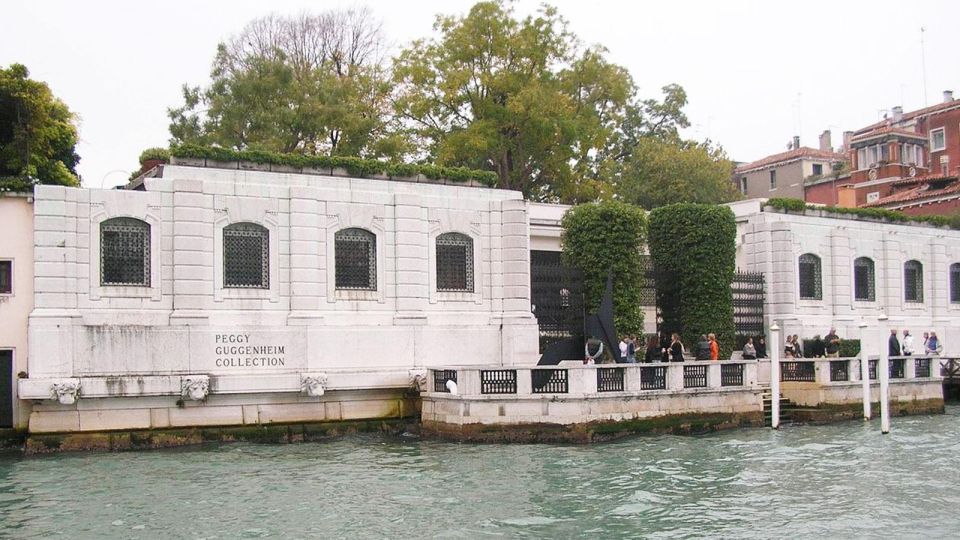
- Guggenheim
- Biennale
You can treat these as a theme loop: listen to one before you enter, then keep it light and factual while you’re inside. Even if you don’t know art history, audio guidance helps you slow down and notice what you’d otherwise skip.
A practical tip: if you’re doing multiple museum stops, don’t play every track in full. Pick one “main chapter,” then save the rest for later that day or another trip.
Arsenal + Murano: Venice’s wider world
The app includes Arsenal and Murano. These help you move beyond the core tourist lanes.
Use the Arsenal track when you’re thinking about Venice’s maritime identity. It’s the kind of place where context changes your view from “cool building” to “purpose-built history.”
Then Murano gives you a different pace. Even if you’re only there briefly, an audio chapter can help you connect the island to how Venice works as a whole city, not just a single set of streets.
Scuola chapters + San Sebastiano + San Zanipolo: the city’s quieter identity
Venice also lives in its side streets and smaller faith spaces. This app covers:
- San Sebastiano
- San Zanipolo
- Scuola Di S. Giorgio Degli Schiavoni
- Scuola Grande Di San Rocco
These tracks are especially valuable if you like wandering. They reward you for choosing less obvious paths. When you’re in front of a smaller church or a scuola, audio can keep you from missing the meaning of details.
The Ghetto: a necessary chapter you can’t skip
The app includes The Ghetto. This is the kind of chapter that changes the tone of your day. If your Venice experience has been mostly scenic, this track can add gravity and perspective.
I’d pair it with a slower pace. Don’t rush through this area just to check it off. Even a short listen can turn a walk into something you remember.
The one drawback to plan for: occasional shaky specifics

The biggest downside showed up in a common way: some content may include questionable numbers. One example given was a claim about how many steps you need to reach the tower of St. Mark’s Basilica. That kind of detail is exactly where you shouldn’t rely on audio as your only source.
So here’s my advice: use the app for story, names, and the reason the place matters. For exact measurements, don’t guess from audio—check the signage or official info once you’re standing there.
This matters because you’re paying for convenience and accuracy in equal measure. Even with inaccuracies, the app can still be great for getting oriented and entertained. Just treat it like a guide, not like a ruler.
Multilingual audio that actually helps

The app includes audio in Chinese, English, French, German, Italian, Russian, and Spanish. That’s a big deal if you’re traveling with someone who doesn’t want to “make do” in a language they’re not comfortable with.
Also, having audio plus text is useful for language learners. If a name is hard to pronounce, reading it in the app can help you connect what you heard to what you’re seeing.
Accessibility and smartphone reality

The activity is listed as wheelchair accessible, which is encouraging. Still, Venice is Venice: narrow streets and bridges can affect your route. The audioguide helps because you control your pace and can pause or change your path without waiting on a group.
On the tech side, the app emphasizes that you use your own phone, so you’re not sharing devices with strangers. That’s a small comfort, and it matters in crowded places.
Should you book the TravelMate Venezia audioguide?

If you want a low-cost, self-paced way to understand major sights (and not just take photos), I think this is a smart buy. The combination of 85 tracks, offline capability, and long validity makes it easy to justify at $6. You can use it for one trip or keep it for later.
Book it if:
- You like flexibility over group schedules
- You want stories while you walk
- You’re comfortable double-checking exact figures on-site
Skip it (or use it more lightly) if:
- You need guaranteed precision on numbers and counts
- You hate headphones and prefer unfiltered sightseeing
In short: this audioguide is a practical way to turn Venice into a narrated walk. Use it for guidance and vibes, verify the few specifics that might matter, and let your route be your own.
FAQ
How much does the Venezia Audioguide cost?
It’s listed at $6 per person.
Do I need to meet a guide at a specific time or place?
No. There is no meeting point. You download the app and start your experience straight away wherever you prefer.
How long is the audio content, and how many tracks are included?
The app includes 85 audio content pieces totaling 255 minutes.
Can I listen offline in Venice?
Yes. The guide can be listened to online or offline.
How long is the app valid after I activate it?
It’s valid for 1095.5 days from the first activation.
What languages are available?
Audio content is included in Chinese, English, French, German, Italian, Russian, and Spanish.
Where do I find the activation code?
It’s in the email. You can open the activity details, show your tickets, then tap the barcode in the orange frame to reveal the 10-digit activation code under it. The same activation code can also be shown in the GetYourGuide app.
Is the guide wheelchair accessible?
Yes, the activity is listed as wheelchair accessible.